
Shared Links
Jump back to anything the agent linked you to – without scrolling. As you chat, the agent often points you at notes and web pages. The link button in the chat header collects them all in one place, so that note from twenty messages ago is one click away.
The button sits just left of the ↻ reload button. A small count badge on it shows how many links the agent has shared in this conversation – the same way a count rides on an app icon.
Open the list
Click the link button to open the list. Every link the agent shared in this conversation is there, most-recent first. Internal links show up when they point to a real note in your vault, so passing mentions of notes that don't exist won't clutter the list; web links always show.
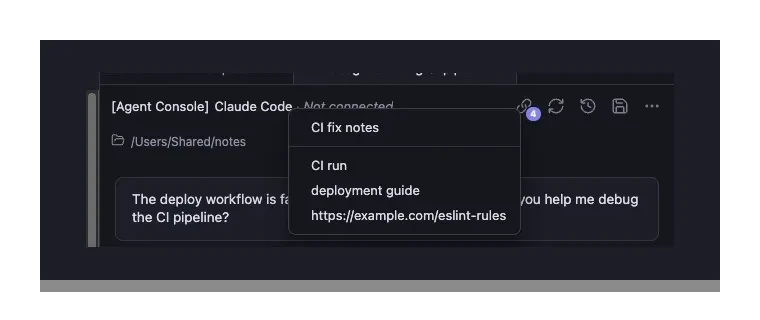
When the agent created a new file during the conversation, those new files float to the top, divided from the rest by a thin separator line so they are easy to spot. If nothing new was created, the list is one clean run of links – no divider. The distinction is shown by position and the separator, never by color, so it reads the same no matter how you see color.
Click to open
- A note or file opens in your vault. Hold Cmd/Ctrl (or middle-click) to open it in a new tab, the same modifiers you'd use on any Obsidian link.
- A web link opens in your browser.
Always there, never in the way
The button is always visible so it never surprises you by appearing and vanishing. When the agent hasn't shared any links yet, the button is greyed out and does nothing. The moment a link shows up, it wakes up and the count appears.
Per tab, and it remembers
Each tab keeps its own list – the links from that conversation. And because the list is built from the conversation itself, it survives an Obsidian restart: reopen the tab and your links are right where you left them, with any newly-created files still floated to the top.
From the keyboard
The link button is reachable with Tab, just like the other header buttons. It shows a focus ring when it has keyboard focus, and Enter or Space opens the list. When it's greyed out (no links yet), Tab skips it.