
Clickable choices
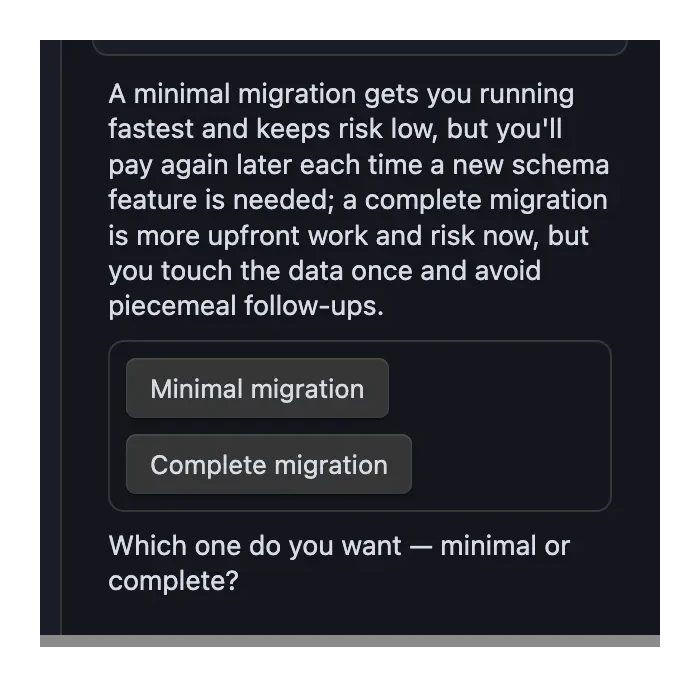
When an agent offers you a small set of options — "minimal fix or full refactor?", "which file first?" — it can show them as buttons right in the reply. Click one and your pick is sent back as a normal message. No retyping the option you want.
How it works
Agents learn this ability from the Obsidian system prompt: a default-on item teaches them to offer choices as buttons when it genuinely helps. The agent's reply still explains the options in words — the buttons are a faster way to answer, not a replacement for reading.
- Buttons activate when the reply finishes. While the agent is still writing, they show up but stay off.
- One click, one answer. After you pick, your choice is highlighted and the other buttons fade. The choice group is answered once — the agent's next reply carries on from your pick.
- Your pick is a visible message. Clicking sends a regular message that starts with a line like
Selected: Complete migration, with the machine-readable details tucked behind a small expander. Nothing is sent invisibly. - Long labels wrap. A label too long for the panel wraps onto more lines and the button grows to fit, so the text always stays inside the button.
- Keyboard works everywhere. Tab to a button, press Enter or Space — same as clicking.
When buttons wait
Buttons only work when the chat is ready for a new message. If a reply is still streaming, a message is already queued, or the conversation is still loading, the buttons stay off with a short tooltip explaining why. They come back as soon as the chat is idle.
If the agent isn't running — right after you restart Obsidian, for example — the buttons stay clickable. Picking one starts the agent again and sends your choice as soon as it's ready, the same as typing a message would. Your draft in the message box is left alone.
Safety
The buttons are drawn entirely by Agent Console using your theme — agents can't inject their own styling, images, links, or code. A button can only ever do one thing: send a message you can see. And the label on the button is never trusted blindly — the sent message always shows the real underlying choice, so what you clicked and what was sent can't quietly differ.
Token cost
Teaching this ability has a small, ongoing cost, so it's worth knowing what you're paying for:
- Always on: the instruction that teaches agents to offer buttons rides in every message you send the agent (~460 tokens on Codex, ~730 on Claude), whether or not any buttons appear.
- Per use: each choice group the agent shows (~150 tokens) and each button you click (~70 tokens, versus a word or two if you typed your answer) stay in the conversation and are re-sent as it grows.
In total that's roughly a 3–6% increase in per-message token use — the low end when no buttons are used, the high end when a choice is in play. All of it is cache-eligible, so the real cost is a fraction of that. If you rarely use clickable choices, turning the setting off (below) removes the cost.
Turning it off
Open Settings → Community plugins → Agent Console → Obsidian system prompt and switch off Offer clickable choices. New chats stop teaching agents the ability; any choice blocks in old replies simply show as code.
TIP
If a reply shows a code block labeled a2ui instead of buttons, that block didn't pass Agent Console's safety checks (or this ability is switched off). The conversation still works — just answer by typing.