
Queueing and steering
While the agent is writing a reply, you often already know what you want to say next. Agent Console gives you two ways to act without waiting for the cursor: queue your next message so it sends the moment the reply finishes, or steer the agent by stopping the current reply and sending your message right away.
Both work straight from the message box while the agent is streaming a reply. You never need the mouse.
Queue your next message
Type your follow-up while the agent is working and press Enter. Your message is held and sent automatically the moment the current reply finishes.
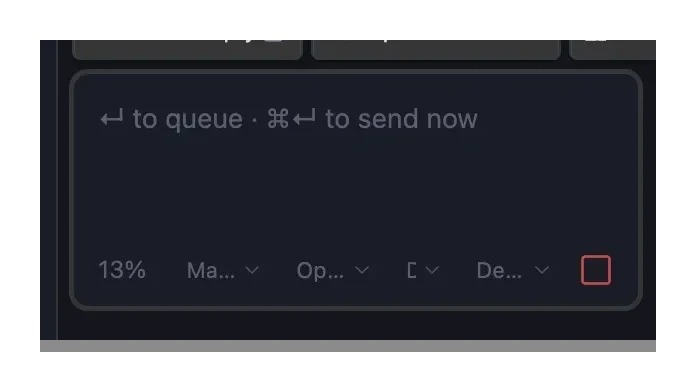
- The message box locks and shows a Queued banner so you know it is waiting.
- Use Edit to change the message before it sends, or Delete to drop it.
- Changed your mind and don't want to wait? Click Send now. It stops the current reply and sends your queued message right away – the same as steering, without retyping. The steer keys (below) do the same thing while a message is queued. Send now appears once the agent is connected; while it is still connecting, your message already sends the moment it's ready.
- Only one message can be queued at a time. This keeps things predictable — you always know exactly what will send next.
- If you stop the reply, or it ends with an error, the queued message is kept as a normal draft instead of being sent into a reply that never finished. The composer unlocks and the banner goes away, so you can edit the text and send it when you're ready.
Queueing is the safe default: nothing happens to the agent's current work, and you can always change your mind.
Steer the agent mid-reply
Sometimes the agent is heading the wrong way and you want to redirect it now. Steering stops the current reply and sends your message as the next one, in a single keypress.
- In the default setup (Enter sends), press
Mod+Enter to steer. - If you have set the app to send with
Mod+Enter, steer withMod+Shift+Enter instead.
Mod is ⌘ on macOS and Ctrl on Windows and Linux. The message box shows the exact keys for your setup while the agent is replying.
When you steer, the current reply stops and your message sends as a fresh turn — you'll see the usual working animation and a Stop button while it runs. The agent keeps the whole conversation so far, so you are redirecting it, not starting over.
Queue is the default, steering is the opt-in
A plain Enter always queues (nothing is interrupted). Steering takes the extra modifier key on purpose, so you never stop a reply by accident. If a message is already queued, the steer keys send that message now instead of starting a new one – the same as clicking Send now. To steer with different text, edit or delete the queued message first.
Which one should I use?
| You want to… | Do this |
|---|---|
| Line up your next step and let the reply finish | Type it, press Enter (it queues) |
| Redirect the agent right now | Type it, press the steer keys (Mod+Enter, or Mod+Shift+Enter if you send with Mod+Enter) |
| Send a message you already queued, right now | Click Send now on the queued banner (or press the steer keys) |
| Just stop the reply and keep your text | Press the Stop button — your text stays in the box |
Good to know
- Steering keeps your conversation. After a steer, the agent still has everything said so far as context. Whether it remembers the exact half-finished step it was on when you interrupted can vary by which agent you use.
- The Stop button always works. Steering never removes your ability to simply stop a reply — the Stop button stays active the whole time the agent is replying.