
Importing settings from another plugin
Already set up another agent plugin? You don't have to start over. Agent Console can bring your setup across in one step – your agent definitions, your default agent, your preferences, and your API keys.
The first source it supports is Agent Client (the plugin Agent Console is based on), so switching over keeps everything you already configured.
What gets imported
- Agent definitions – the command, arguments, and environment for Claude Code, Codex, Gemini CLI, and any custom agents you added.
- Your default agent and general preferences (permissions, notifications, export, and display settings).
- API keys – in most cases these come across without you re-entering anything. See "About your API keys" below.
Anything specific to Agent Console – your Kiro CLI setup, open tabs, and saved sessions – is never overwritten by an import.
Three ways to import
- On first run. The first time Agent Console starts and finds another agent plugin's settings, it shows a notice. Click it to open the import preview. You'll only see this once.
- From the command palette. Run Import settings from another agent plugin any time.
- From settings. Open Settings → Agent Console and use Import settings from another plugin → Import…. On a brand-new setup this sits right at the top, where you'd look first. Once you've started using Agent Console it moves into the Advanced section near the bottom, keeping the top of the pane focused on everyday settings.
All three open the same preview, so you always see what will change before anything is applied.
The preview
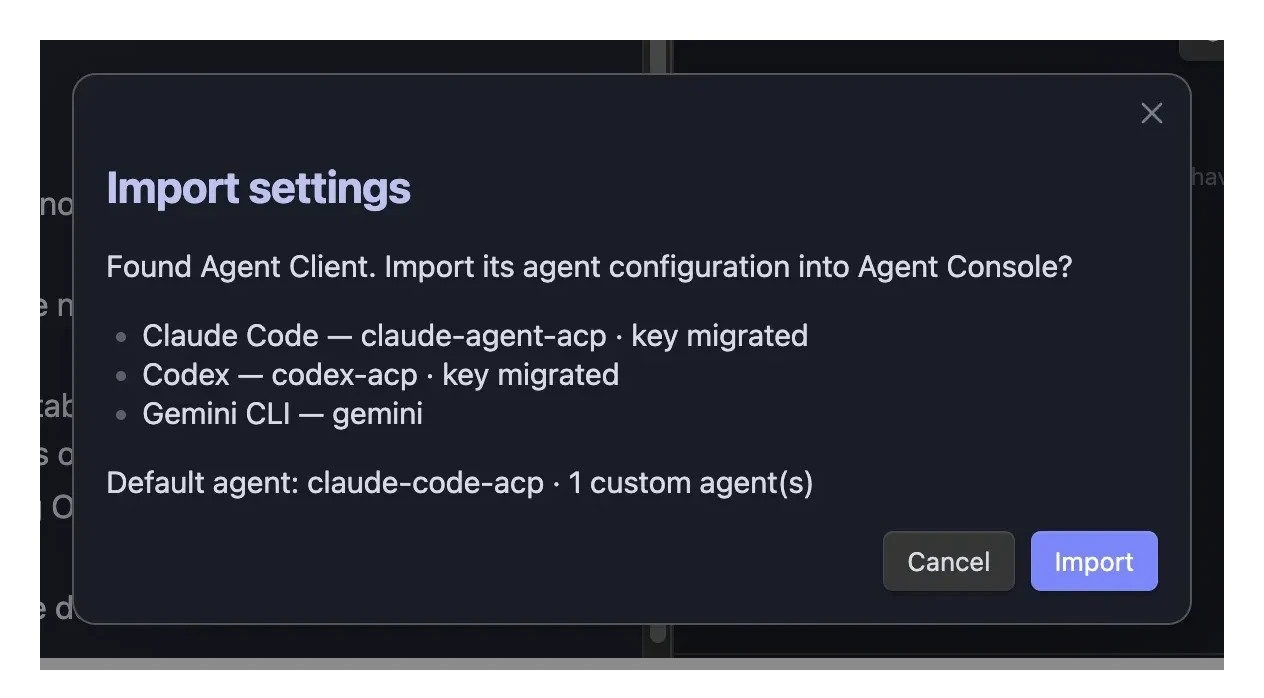
The preview lists the agents it found, the default agent, how many custom agents will come across, and the status of each API key. Nothing changes until you click Import.
About your API keys
Obsidian keeps secrets in a shared keychain, so in most cases your keys port across by reference – Agent Console points at the same stored key and you never re-enter it. The key's value is never shown or copied.
Two cases need a moment of attention:
- Older plugin versions stored the key as plain text. Agent Console moves it into Obsidian's keychain for you during the import.
- Re-link needed. If a key isn't found in this vault's keychain, the preview flags it as "needs re-link" – just re-enter that one key in settings after importing.
If nothing is found
If Agent Console doesn't find a supported plugin's settings, the import dialog simply says so. There's nothing to do – set up your agents normally.