
First Run
The first time you enable Agent Console, it tries to get you chatting with as little setup as possible.
It picks an agent that's already installed
On a brand-new install, Agent Console checks which supported agent CLIs are on your machine and sets the default to the first one it finds, in this order:
- Kiro CLI
- Claude Code
- Codex
- Gemini CLI
So if you already have one installed, your first chat connects to it without visiting settings. If none is found, the default stays Claude Code and the panel guides you from there (see below).
TIP
This detection runs once, only on a fresh install, and after the workspace has finished loading — it never slows Obsidian's startup. Your choice is remembered, so this never overrides a default you set yourself later.
It opens the chat panel for you
Still on that first install, Agent Console opens the chat panel once so you don't have to hunt for the ribbon icon. After that, the panel only opens when you ask for it — via the robot icon in the left ribbon or the Open chat command. It never forces itself open on later launches.
It never leaves you on a dead end
If no agent is connectable yet — nothing installed, or the configured command can't be found — the panel shows a getting-started screen instead of an endless "Connecting…":
- One-click picks for any agent it detected on your machine. Click one to start chatting with it.
- Install an agent without leaving Obsidian. When nothing is detected, each supported agent shows an Install button that runs the one-line install for you and streams the output right there. If your setup needs a permission the plugin doesn't have (some system Node installs do), the install stops with a plain explanation and a Copy command button so you can finish in your terminal. Kiro links to its setup guide instead, since it isn't an npm package.
- Each agent name links to its setup guide on this site, so you can read the details first.
- An Open settings button that jumps straight to Agent Console's settings, where you can choose a provider or set a CLI path by hand.
- A Re-detect button that re-runs the scan. If you installed an agent outside Obsidian – or set it up with environment variables only – it may not show up until you click Re-detect, which refreshes the list without restarting Obsidian.
- A hint for the case where you installed a CLI somewhere custom — point Agent Console at it with an absolute path in settings.
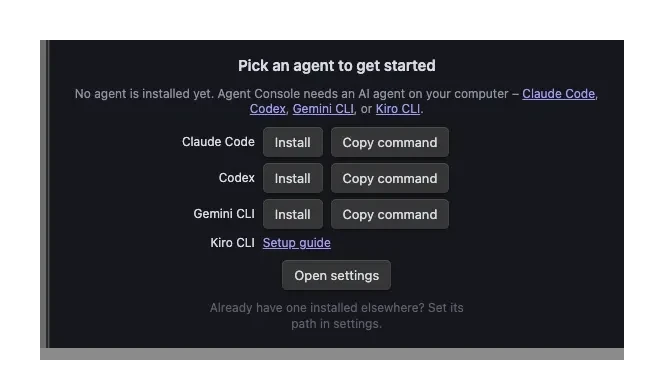
While this screen is up, the message box is turned off — there's no agent to send to yet. It turns back on the moment an agent is installed or picked.
Detection here is the same login-shell-aware check used for the default pick, so it finds CLIs installed under version managers (mise, nvm, asdf) and ~/.local/bin, not just the system path.
INFO
Detecting that a CLI is installed is not the same as confirming it can sign in. Agent Console shows you what's installed; authentication is validated when you start your first chat, and any failure is surfaced right in the panel.
What's next
- Pick or fine-tune your agent in Agent Setup
- Walk through your first conversation in the Quick Start