
MCP Tools
AI agents can use Model Context Protocol (MCP) tools to interact with external services and perform specialized tasks.
What is MCP?
The Model Context Protocol (MCP) is an open standard that allows AI agents to connect to external tools and data sources.
TIP
MCP support and configuration depend on the agent. Refer to your agent's documentation for details.
How MCP Works
When an agent uses an MCP tool:
- The agent decides which tool to use
- The tool call appears in the chat
- The tool executes and returns results
- The agent uses the results to continue
Viewing Tool Calls
Tool calls are displayed in the chat as a single collapsed row with:
- Tool name: What tool was used
- Status: Running, completed, or failed
- Line count: How many lines the call contains
Click the row to expand it and see the full detail — a file diff, terminal output, or, for other tools (such as MCP tools and subagent calls), the tool's raw input and output. The line count always matches what the expanded view shows. A failed call stays collapsed but is flagged with a highlighted status indicator, so you can spot it at a glance and expand it when you want to read the error. Pending permission requests expand automatically so you can act on them.
Permissions
Some MCP tool calls may require your permission before executing. When a permission request appears, select one of the available options provided by the agent.
See Editing for permission settings.
Remote servers and sign-in
Some MCP servers run as remote services and need you to sign in with an account before their tools work — for example, Google's official Workspace MCP servers use your Google account.
TIP
Sign-in prompts currently work with Kiro CLI, which sends the sign-in request over the wire. Other agents handle server sign-in themselves.
When a server needs sign-in, a prompt appears in the corner with the server's name and where the sign-in page leads (for example, accounts.google.com). Nothing opens on its own — click Sign in to open the page in your browser, or Copy link to open it elsewhere. Once you finish signing in, the prompt goes away by itself and the server's tools start working.
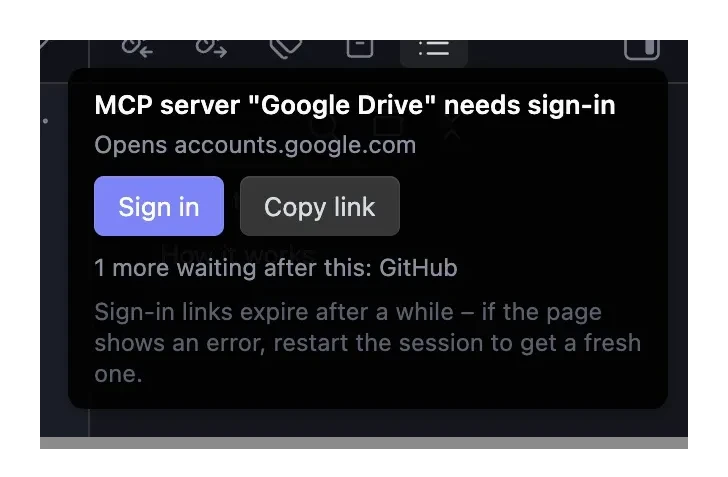
If several servers need sign-in, they take turns: finish one and the next prompt appears. The prompt shows how many are still waiting.
A few things to know:
- Sign-in links expire after a while. If the page shows an error, restart the session to get a fresh link.
- Dismissed the prompt? Run Re-authenticate MCP servers from the command palette — it lists every server still waiting, and can copy the link too.
- Sign-in expired days later? Tool calls from that server start failing with a sign-in error. A Sign in button appears right under the failed call — or run Re-authenticate MCP servers, which offers to restart the session so a fresh prompt can appear.