
Chat Links
Get back to a conversation from anywhere in your vault. Every chat that has a saved reply has its own link. Paste it into a meeting note, a to-do or a project page, and one click brings that chat back.
Copy a link to a chat
Right-click a chat's tab and choose Copy link to chat. It's in the menu whether your tabs sit on top or in the vertical column. The link is copied as a Markdown link named after the tab, so it reads well when you paste it into a note:
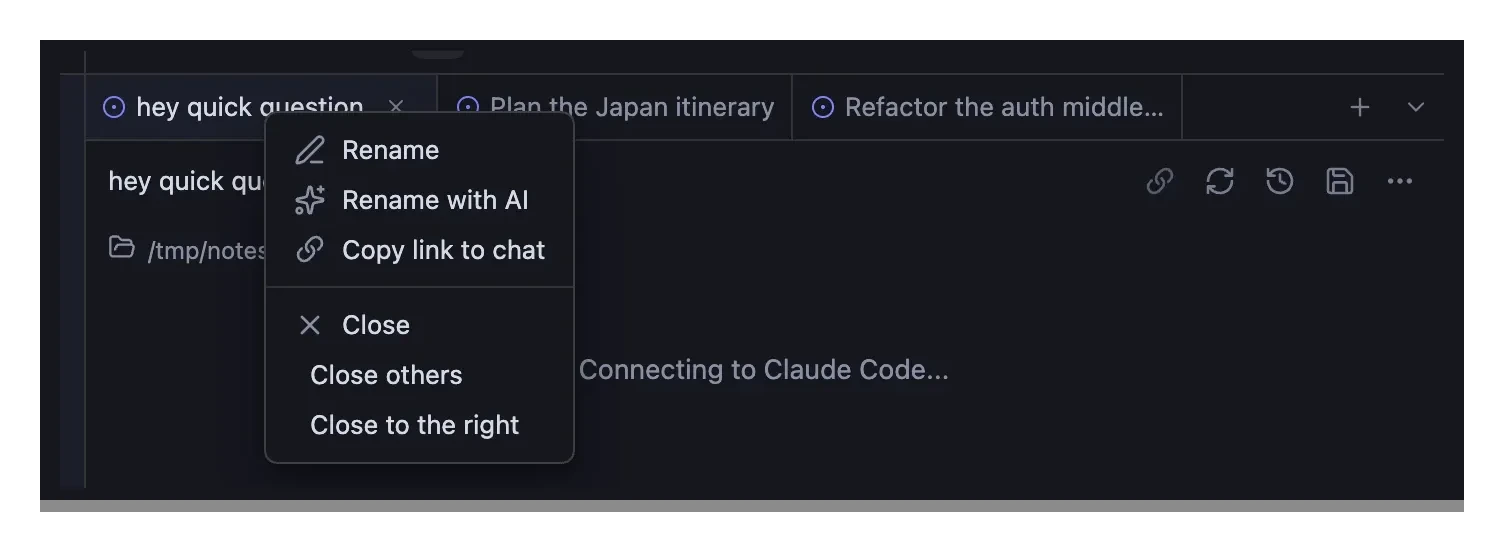
[Plan the Q3 offsite](obsidian://agent-console-chat?vault=My%20Vault&id=4f1c2a90-…)A notice confirms the copy, and you land back in the chat's message box, ready to keep typing.
A chat gets its link once its first reply is saved. On a brand-new chat, Copy link to chat says "Send a message first to get a link to this chat." and copies nothing.
Open a chat from its link
Click the link in a note, another app or your browser. Agent Console:
- switches to the chat when it's open in a tab, in any chat panel or window, including a panel you haven't looked at since Obsidian started
- reopens the chat in a new tab when you closed it. The conversation shows right away, and the chat reconnects to its agent when you type or send
- opens the chat panel first when none is open
Clicking the same link again later takes you back to that tab instead of opening another one.
What keeps a link working
A chat keeps its link when you:
- restart Obsidian
- rename the tab or the chat
- close the tab and reopen the chat later
- keep chatting after the agent had to start a new session for it, or after Kiro CLI changed engine
A chat gets a new link when you start New chat or New chat in directory in its tab, hard-reload or restart the agent, or switch the tab to another agent, even when the earlier messages come along. A forked chat gets a link of its own.
When a link can't open
- "This chat isn't in this vault's history. It may have been deleted." The chat was deleted, or the link came from another vault or another computer. A link works only in the vault, and on the computer, that holds the chat's history.
- "Links are opening too fast. Wait a moment and try again." Two different chat links opened within 2 seconds, or you clicked a link again within 2 seconds of a link that couldn't open. Wait a moment and click it once. Clicking a link that works twice quickly is fine; the second click is ignored.
- "Couldn't open the chat panel. Try the link again." The chat panel didn't finish loading, or it closed while the link was opening.
Links carry the vault's name, so renaming the vault breaks them, and Obsidian shows "Vault not found." To fix them, find and replace vault=Old%20Name with vault=New%20Name across your vault.
Exported chats
An exported chat note has a chat_id property with the same ID its link uses, so you can tell which chat a note came from. See Chat Export.